ThinkPad Laptops

ThinkPad 500

Machine Type 2603 · 1993 · 26 sections

Compact subnotebook ThinkPad with 486SLC2 CPU.

Product Overview #

The ThinkPad 500 is a highly portable subnotebook known for being one of IBM's earliest miniaturized fully-functional ThinkPads.

Feature Description
Processor (MHz) 386SX 20-Mhz
Bus Architecture AT Bus
Memory (Standard) 2MB
Memory (Maximum) 18MB
Video VGA
Diskette Drive 3.5-inch
Hard Drive 60MB

General Checkout #

  • Note: Some icons remain on after 1 second.
  • 2. Memory counts.
  • 3. One or two short beeps
  • 4. The Speaker icon starts blinking and continues blinking
  • until any key is pressed
  • 5. The IBM Logo is displayed on the screen.
  • DID YOU RECEIVE THE CORRECT RESPONSES ?
    • If Yes: proceed to next step
    • If No: Go to 'Symptom-to-FRU Index'
    • |
    • +-+-+
    • - Advance to the Main Menu.
    • - Press Ctrl+A, then type 0 to run the tests
    • DID YOU RECEIVE AN ERROR MESSAGE OR ERROR CODE ?
      • If Yes: proceed to next step
      • If No: The diagnostic tests have completed
      • |        without detecting an error.
      • +-+-+
      • Go to 'Symptom-to-FRU Index'
  • DOES THE POWER SOURCE APPEAR TO BE OK ?
    • If Yes: proceed to next step
    • If No: Go to 'Power Systems Checkout'
    • |
    • +-+-+
    • - Power-off the computer and all external devices.
    • - Insert the backup copy of the Advanced Diagnostics
    • diskette into the diskette drive.
    • - Power-on the computer and check for the following responses:
    • 1. All icons on the system-status display appear
    • once for about 1 second.
    • NOTE: Some icons remain on after 1 second.
    • 2. Memory counts.
    • 3. One or two short beeps
    • 4. The Speaker icon starts blinking and continues blinking
    • until any key is pressed
    • 5. The IBM Logo is displayed on the screen.
    • DID YOU RECEIVE THE CORRECT RESPONSES ?
      • If Yes: proceed to next step
      • If No: Go to 'Symptom-to-FRU Index'
      • |
      • +-+-+
      • - Advance to the Main Menu.
      • - Press Ctrl+A, then type 0 to run the tests
      • DID YOU RECEIVE AN ERROR MESSAGE OR ERROR CODE ?
        • If Yes: proceed to next step
        • If No: The diagnostic tests have completed
        • |        without detecting an error.
        • +-+-+
        • Go to 'Symptom-to-FRU Index'

How to Run Advanced Diagnostics #

  1. Power-off the computer.
  2. Insert the backup copy of the Reference Diskette into the diskette drive.
  3. Power-on the computer.
  4. Advance to the Main Menu.
  5. Press Ctrl+A to run the System Checkout.

Symptom-to-FRU Index #

Note: If you have an IBM device with its own service manual or a device not supported by the advanced diagnostics tests, refer to the manual for that device.

The ThinkPad 500 is a highly portable subnotebook known for being one of IBM's earliest miniaturized fully-functional ThinkPads.

The Symptom-to-FRU Index lists symptoms and errors and the possible causes. The most likely cause is listed first.

If the computer displays an error message, first replace FRUs listed in the error message. An X in an error message can be any number.

NOTE: If you have an IBM device with its own service manual or a device not supported by the advanced diagnostics tests, refer to the manual for that device.

Symptom/Error FRU/Action
One or more keys do not work. (See 'Ext. Keyboard/Aux. Input Device Checkout' before replacing any FRUs.) 1. Keyboard
2. System Board
No beep and a blank or unreadable display during POST. (See 'Power Systems Checkout' before replacing any FRUs.) 1. System Board
2. Any options or devices Power source when failing Speaker
No beep with a normal display during POST. 1. Speaker
2. System Board
Continuous beep 1. System Board
2. Any options or devices
Repeating short beeps. (See 'Ext. Keyboard/Aux. Input Device Checkout' before replacing any FRUs.) 1. System Board
2. Keyboard
Dew Point or Temperature icon appears with one long and one short beep 1. System Board
2. Power source when failing
One long and one short beep. 1. System Board
2. Power source when failing
One long and two short beeps. 1. System Board
2. Power source when failing
One short beep and a blank, unreadable, or flashing display with no external display attached. 1. Display (LCD)
2. System Board
3. Power source when failing
One short beep and Diskette Prompt or a program load from the hard disk drive or unable to read diskette(s). 1. Diskette Drive
2. System Board
3. Diskette Drive Cable
Two short beeps and a blank display. 1. System Board
2. Any options or devices
External display problems. (See 'External Display Self Test' before replacing any FRUs.) 1. External Display
2. System Board
Incorrect memory size during POST. (See 'Memory Checkout' before replacing any FRUs.) 1. System Board
2. Memory Module Kits
Computer hang-up or intermittent hang-up. 1. System Board
2. Hard Disk Drive
3. Math Coprocessor
4. Replace the last device being tested (See 'Undetermined Problem'.)
Computer does not suspend or resume. (Check the Suspend icon to make sure of the failure.) 1. System Board
2. System-Status
3. Display Assembly
4. Any options or devices
Computer does not power off. 1. System-Status Display Assembly
2. System Board
Real-time clock inaccurate. 1. System Board
Printer problems. 1. See 'Printer Checkout'
Serial or parallel port device problems. 1. Device
2. Cable
3. System Board
ICON is incorrectly blinking or stays on. 1. System Board
2. Related Device
ICON incorrectly remains off, but diagnostics runs without an error. 1. System Board
2. Related Device
3. System-Status Display Assembly
Internal Data/Fax Modem does not communicate with a remote modem or a fax. (See 'Fax/Modem Checkout' before replacing any FRUs.) 1. Internal Data/Fax Modem (Make sure Data/Fax Modem power option is set to on in the Set Features program.)
101, 103, 107, 111 1. System Board
2. Hard Disk Drive
3. Diskette Drive
4. Any attached devices
109, 110, 121 (See 'Memory Checkout' before replacing any FRUs.) 1. Memory Module Kits
2. System Board
122, 124 1. System Board
2. Auxiliary Input Device
3. Keyboard
123 1. Hard Disk Drive
2. System Board
3. Hard Disk Drive Cable
141 1. System-Status Display assembly
2. System Board
149 1. System Board
2. Hard Disk Drive
3. Hard Disk Drive Cable
161 1. Run Automatic Configuration
2. Backup Battery
3. System Board
162 1. Run Automatic Configuration, then check the installed devices using the View configuration utility.
2. System Board
3. Diskette Drive
4. Hard Disk Drive
5. Math Coprocessor
6. Diskette Drive Cable
7. Hard Disk Drive Cable
163 1. Time and Date Set ?
2. System Board
164 (See 'Memory Checkout' before replacing any FRUs.) 1. Run Automatic Configuration
2. Memory Module Kits
3. System Board
199 1. See 'Checking Installed Devices'
1XX (not listed above) 1. System Board
211 (on POST) 1. System Board
2. Memory Module Kits
221 (on POST) 1. System Board
204, 214, 224, 240 1. System Board
2. Memory Module Kits
25X 1. System Board
2XX (not listed above) (See 'Memory Checkout' before replacing any FRUs.) 1. Memory Module Kits
2. System Board
301, 302 1. System Board
2. Keyboard
303 1. System Board
2. Numeric Keypad
3. Keyboard
304, 305 (See 'Ext. Keyboard/Aux. Input Device Checkout' before replacing any FRUs.) 1. Keyboard
2. System Board
3. Numeric Keypad
306, 310 1. System Board
308 1. Numeric Keypad
3XX (not listed above) (See 'Ext. Keyboard/Aux. Input Device Checkout' before replacing any FRUs.) 1. System Board
2. Auxiliary input device
3. Keyboard
602, 653, 654 1. Defective diskette
2. Diskette Drive
3. System Board
655, 660, 661 1. System Board
6XX (not listed above) 1. Diskette Drive
2. System Board
3. Diskette Drive Cable
7XX 1. Math Coprocessor
2. System Board (IBM does not supply a math coprocessor)
9XX 1. System Board
2. Any parallel Device
3. Communication Cable
1107 1. Communication Cable
11XX 1. System Board
2. Any serial adapter
3. Communication Cable
1207 1. Communication Cable
12XX 1. Any serial adapter
2. System Board
3. Any serial device
4. Communication Cable
1705 to 1707, 1709, 1711, 1. Hard Disk Drive
1718 to 1720, 1730, 1732 (Reformatting the hard disk can recover from the problem.)
17XX (not listed above) 1. Hard Disk Drive
2. System Board
3. Hard Disk Drive Cable
24XX 1. System Board
5001 to 5016 1. System Board
5017 to 502X 1. System Board
2. LCD Display Assembly
503X 1. External CRT Display
2. System Board
8601, 8602 1. Pointing Device
2. System Board
3. Numeric Keypad
8604 1. System Board
86XX (not listed above) 1. System Board
2. Pointing Device
3. Numeric Keypad
101XX (See 'Fax/Modem Checkout' before replacing any FRUs.) 1. Internal Data/Fax Modem
2. System Board
3. Any serial device
102XX 1. System-Status Display Assembly
2. System Board
3. Related device

FRU Removals and Replacements #

reminpi   FRU Removals and Replacements

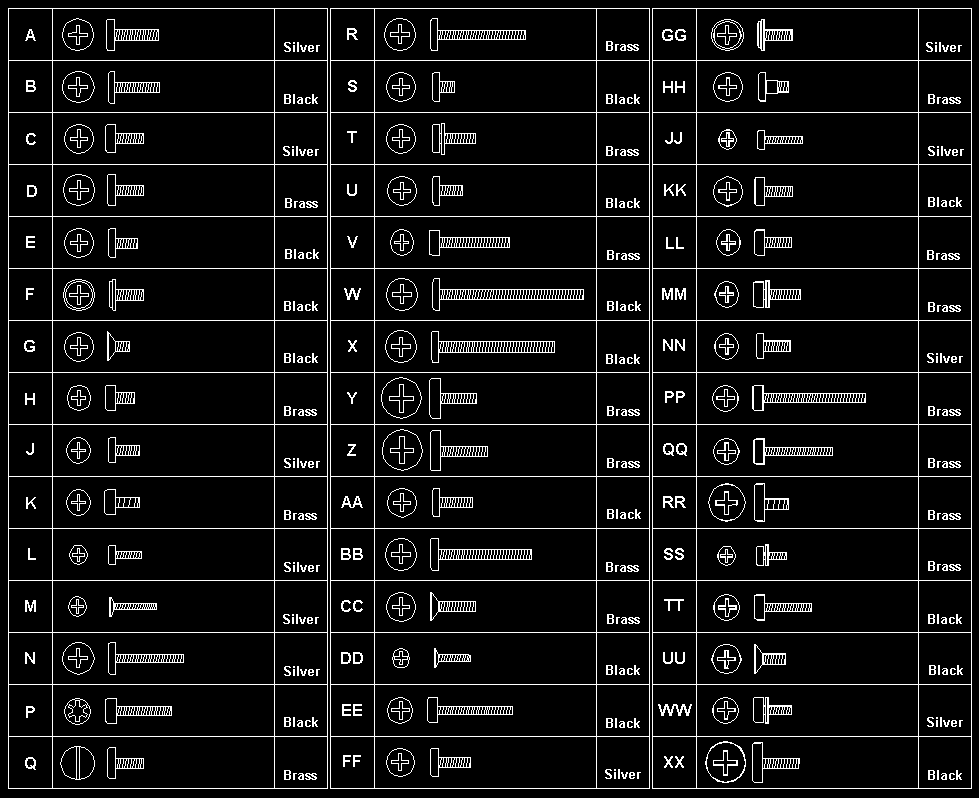
Follow the numerical sequence in the FRU removal sequence list and the exploded view to remove or disconnect parts in the correct order. The letters in parentheses in the list indicate screw types. See the 'Screw Size Chart' to match the letters to the correct screw type and size before replacing each screw.

warn3   **Safety 8

Safety 1**

  1. Battery Pack- Three Screw Covers and Three Screws (C)- Loosen Keyboard Assembly

    (Raise front until it clears case.)- Two Ribbon Cables and Keyboard

       (Slide keyboard forward and flip it over in front of computer.)- **Three Top Cover Screws** [(C)](#screw-size-chart)
    
         (Inside right and left rear access doors along top edge)- **Two Status Display Ribbon Cables**- **Top Cover**
    
             (Use small screwdriver to release latch on left side, if
    
             necessary.)- **Two Status Display Screws** [(F)](#screw-size-chart)
    
               (One on each end)- **Status Display Assembly**
    
                 (contains on/off and power saver switches)- **Four Hinge Screws** [(C)](#screw-size-chart)
    
                   (Two on each end, inside two rear access doors)- **Left Hinge Cables**- **Right Hinge Cables**- **LCD Assembly**- **Memory Modules**
    
                           (Do not install two 4MB memory module kits. Install a 2MB
    
                           memory module kit in connector 1 and a 4MB or 8MB memory module kit in
    
                           connector 2.)- **Two Screws** [(F)](#screw-size-chart)
    
                             (At front edge of diskette drive)- **Two Diskette Drive Ribbon Cables**- **Diskette Drive and Drive Mounting Bracket**- **Standby Battery**- **Battery Shield**- **Backup Battery**- **Adapter Bezel**- **One Screw** [(F)](#screw-size-chart)
    
                                           (In corner of serial/modem card)- **Serial/Modem Card**- **Two Screws** [(F)](#screw-size-chart)
    
                                               (At front edge of hard disk drive)- **Two Ribbon Cables and Hard Disk Drive**
    
                                                 (Have customer backup all information on hard disk drive before
    
                                                 removal.)- **External Adapter and Battery Doors**- **Eight System Board Screws** [(F)](#screw-size-chart)- **One Screw** [(C)](#screw-size-chart)
    
                                                       (Inside right-rear access door)- **Two Threaded Hex Spacers**
    
                                                         (Inside right-rear access door)
    
                                                         **Remaining System Board Cables**- **System Board**
    
                                                           (When replacing system board, install old memory module kits and
    
                                                           math coprocessor on new system board. Run Automatic Configuration using
    
                                                           customer's backup Reference Diskette.)
    
                                                         - **Speaker**
    

Back to

Locations #

System Board Locations

  1. Suspend/Resume Switch
  2. Backup Battery Connector
  3. Battery Contacts
  4. Standby-Battery Connector
  5. Diskette-Drive Connectors
  6. Display Power Connector
  7. Math Coprocessor Connector
  8. Memory-Module Connector 1
  9. Memory-Module Connector 2
  10. Speaker Connector
  11. Keyboard Connectors
  12. Password-Override Connector
  13. Switch-Assembly Connector
  14. System-Status Display Connector
  15. Option Connector
  16. Hard-Disk Drive Connectors
  17. Display Signal Connectors
  18. Suspend/Resume Switch Connector

d2na0355

Parts Listing (L40SX) #

d2na0180

Safety Notice 8 #

warn3  Safety Notice 8

Before removing any FRU, power-off the computer, unplug all power cords from electrical outlets, remove the battery pack, then disconnect any interconnecting cables.

Avant de retirer une unité remplaçable en clientèle, mettez le système hors tension, débranchez tous les cordons d'alimentation des socles de prise de courant, retirez la batterie et déconnectez tous les cordons d'interface.

Die Stromzufuhr muß abgeschaltet, alle Stromkabel aus der Steckdose gezogen, der Akku entfernt und alle Verbindungskabel abgenommen sein, bevor eine FRU entfernt wird.

Prima di rimuovere qualsiasi FRU, spegnere il sistema, scollegare dalle prese elettriche tutti i cavi di alimentazione, rimuovere la batteria e poi scollegare i cavi di interconnessione.

Antes de quitar una FRU, apague el sistema, desenchufe todos los cables de las tomas de corriente eléctrica, quite la batería y, a continuación, desconecte cualquier cable de conexión entre dispositivos.

Safety Notice 1. #

warn3  Safety Notice 1

Before the computer is powered-on after FRU replacement, make sure all screws, springs, or other small parts are in place and are not left loose inside the computer. Verify this by shaking the computer and listening for rattling sounds. Metallic parts or metal flakes can cause electrical shorts.

Avant de remettre l'ordinateur sous tension après remplacement d'une unité en clientèle, vérifiez que tous les ressorts, vis et autres pièces sont bien en place et bien fixées. Pour ce faire, secouez l'unité et assurez-vous qu'aucun bruit suspect ne se produit. Des pièces métalliques ou des copeaux de métal pourraient causer un court-circuit.

Bevor nach einem FRU-Austausch der Computer wieder angeschlossen wird, muß sichergestellt werden, daß keine Schrauben, Federn oder andere Kleinteile fehlen oder im Gehäuse vergessen wurden. Der Computer muß geschüttelt und auf Klappergeräusche geprüft werden. Metallteile oder -splitter können Kurzschlüsse erzeugen.

Prima di accendere l'elaboratore dopo che é stata effettuata la sostituzione di una FRU, accertarsi che tutte le viti, le molle e tutte le altri parti di piccole dimensioni siano nella corretta posizione e non siano sparse all'interno dell'elaboratore. Verificare ci• scuotendo l'elaboratore e prestando attenzione ad eventuali rumori, eventuali parti o pezzetti metallici possono provocare cortocircuiti pericolosi.

Antes de encender el sistema despues de sustituir una FRU, compruebe que todos los tornillos, muelles y demás piezas pequeñas se encuentran en su sitio y no se encuentran sueltas dentro del sistema. Compruébelo agitando el sistema y escuchando los posibles ruidos que provocarían. Las piezas metálicas pueden causar cortocircuitos eléctricos.
Power Systems Checkout #

Note: One or all of the batteries can discharge if there is a short circuit in the computer.

NOTE: One or all of the batteries can discharge if there is a short circuit in the computer.

  1. Replace the failing FRU if the power supply problem is caused by a short circuit.
  2. Determine if one (or all) of the batteries have become discharged.  Replace a discharged battery with a known-good spare (or recharge the main or standby battery.)

The test procedures for each power supply are found on the following pages.

None of the above? Follow the steps below.

  • DID THE PROBLEM OCCUR ONLY WHEN USING THE AC ADAPTER ?
    • If Yes: proceed to next step
    • If No: Go to Step 004
    • |
    • +-+-+
    • Go to 'Testing the AC Adapter'.  If that does not
    • correct the problem, replace the system board.
    • DID THE PROBLEM OCCUR ONLY WHEN USING THE BATTERY ?
      • If Yes: proceed to next step
      • If No: Go to Step 011
      • |
      • +-+-+
      • DOES A FULLY-CHARGED BATTERY DISCHARGE QUICKLY ?
        • If Yes: proceed to next step
        • If No: Go to Step 010
        • |
        • +-+-+
        • - Run advanced diagnostics for all devices using the AC adapter.
        • Use the RUN TEST ONE TIME option.
        • DID ALL THE TESTS END WITHOUT AN ERROR ?
          • If Yes: proceed to next step
          • If No: Follow the instructions on the screen.
          • |        If the instructions do not appear or do not correct
          • +-+-+           the problem, replace the system board.
          • Go to 'Testing the Rechargeable Battery'.  If that does
          • not correct the problem, replace the system board.
          • - Remove the following if installed:
          • ° Rechargeable battery
          • ° Standby battery
          • ° Backup battery
          • ° Memory module kits in connectors 1 and 2
          • ° Internal Data/Fax Modem adapter
          • ° Serial adapter
          • ° Numeric keypad
          • ° TrackPoint
          • ° Mouse
          • ° External keyboard
          • ° External CRT display
          • ° Cables to the hard disk drive
          • ° Cables to the diskette drive
          • ° Power cable to the LCD
          • ° Signal cables to the LCD
          • - Connect the AC adapter and power-on the computer.
          • DID YOU HEAR ONE LONG OR TWO SHORT BEEPS?
            • If Yes: proceed to next step
            • If No: Replace the system-status display to verify the fix.
            • |        If the problem still remains, put back the original
            • +-+-+           system-status display, then replace the system board.
            • - Suspect one of the options or devices.
            • Reinstall each of the options or devices to the computer one
            • at a time, and power-on the computer to see if the original
            • problem occurs.
            • - Replace the last installed option or device when the
            • problem occurs.

Power-on Password #

passpi   Power-on Password

To service a computer with an active, unknown, power-on password, do the following.

  1. Power-off the computer and unplug the power cord.
  2. Remove the system-unit cover.
  3. Move the password jumper J23 to connect the center pin and the pin on  the opposite end of the connector.
  4. Power-on the computer to erase the password. There is no need to move  the jumper back to the previous position.

Testing the AC Adapter #

  1. If a noise can be heard from the AC adapter when it is  plugged into line voltage, replace  the AC adapter.

If a noise still comes from the AC adapter, suspect  the computer.

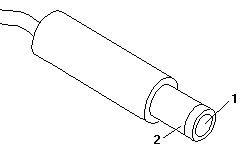
If not, the AC adapter has a problem. Replace the AC adapter with  the original one, then go to the next step.- Measure the output voltage at the plug of the AC adapter cable.

d2na0705 

Pin Voltage (Vdc)
1 +14.3 to +15.8
2 Ground

If the voltage is not correct, replace the AC adapter.

Testing the Rechargeable Battery #

  1. Remove the keyboard.- Set the rechargeable battery in place without  connecting any external power devices.- Measure the voltage between terminals 1 (+) and 2  (-) and note the voltage.

    d2na0775

    • Using the AC adapter, apply external power to the computer.  Make sure that a charge arrow appears in the system-status display.- Measure the voltage again between terminals

      1 (+) and 2 (-).

      If the voltage is not greater than the one measured in Step 3,  replace the AC adapter.

      If the voltage is greater than  the one measured in Step 3, go to the next step.- Remove the rechargeable battery from the computer.- Measure the voltage at the battery terminals.

         ![d2na0776](/static/parts/img/b19e046d4b15.gif)
      
         
      Pin Voltage (Vdc)
      1 +8.5 to +12.6
      3 Ground
       If the voltage is not correct, the rechargeable battery is  discharged or defective. If the voltage is correct, go to the next step.- Using a low-power ohm meter, measure the resistance at the  battery terminals between  2 (T) and 3 (-).   The resistance must be 4 kilohms to 30 kilohms.  If the resistance is out of range, replace the rechargeable battery.

Testing the Backup Battery #

  1. Remove the keyboard and the top cover.
  2. Measure the voltage at the connectors of the backup battery.

d2na0787 

Pin Voltage (Vdc)
1 +2.8 to +3.2
2 Ground

If the voltage is not correct, the backup battery is discharged by a short circuit or is defective.

Testing the Standby Battery #

Note: The charging time required is 48 hours.

NOTE: The charging time required is 48 hours.

  1. Remove the keyboard and the top cover.- Connect the AC adapter to the computer.- Disconnect the standby battery connector from the system board and  measure the voltage at the connector of the standby battery as shown.

    d2na0794 

    Pin Voltage (Vdc)
    1 +3.0 to +4.5
    2 Ground

    If the voltage is correct, perform the failing operation with a  fully-charged standby battery to isolate the problem.

    If the voltage is not correct, continue.- Measure the output voltage at the connector on the system board.

     ![d2na0796](/static/parts/img/a5f5ff97c22b.gif)
    
     If the voltage is higher than measured in Step 3,
      the standby battery is discharged or is defective.
    
     If the voltage is the same as measured
      in Step 3. or less than +3.0 Vdc,
      replace the standby battery.
      If the problem remains, replace the system board.
    

Testing the Quick Charger #

If a noise can be heard from the operating quick charger, replace it.

  1. Perform steps 6 through 8 in 'Testing the Rechargeable Battery' , to  verify the rechargeable battery for correct operation.
  2. Plug the quick charger into an electrical outlet. If the amber power indicator does not turn on, replace the quick charger.
  3. Install the rechargeable battery. If the green charging indicator is not blinking, replace  the quick charger.

External Keyboard / Auxiliary Input Device Checkout #

The following auxiliary input devices may be available for IBM ThinkPad models.

  • Numeric keypad
  • Mouse (PS/2 compatible)
  • External keyboard (with Keyboard/Miniature Mouse cable)
  • If you suspect a problem with any of the auxiliary input devices  (listed above), replace the device.

If the problem is not corrected, replace the following FRUs one  at a time to correct the problem.

  • Keyboard control card
  • System board
  • If the computer receives an incorrect keyboard response,  remove other external devices, check the keyboard connections, and recheck  the keyboard responses. If the problem remains, replace the following FRUs  one at a time to correct the problem.

    • Keyboard
    • Keyboard control card
    • System board
    • If a 00030100 error message appears,  power-off the computer and the external devices.  Then power-on the computer before you power-on the external devices.

External Display Self-Test #

Note: Before you replace a display, check the following list to see if it is connected correctly.

Note: The location of the test margin varies with the type of display. The  test margin might be on the top, bottom, or one or both sides.

If the display problem occurs only when using an external display, use the following instructions to correct the problem.

Note: Before you replace a display, check the following list to see if it is connected correctly.

  • 8506 and 8508 displays must be connected to an Image Adapter/A or an  Image-I Adapter/A.
  • 63XX and 85XX systems support either 63XX or 85XX displays.
  • 85XX systems with an XGA-2 adapter support 95XX displays.
  • 95XX systems support either 63XX, 85XX, or 95XX displays.
  • ThinkPad models support either 85XX or 95XX displays.

If the screen is rolling, replace the display assembly. If that does not correct the problem, replace FRUs in the following order until the problem goes away:

  1. Video card
  2. Display adapter (any type)
  3. System board
  4. Bus adapter (if used)

If the screen is not rolling, run the display self-test as follows:

  1. Power-off the computer and display.
  2. Disconnect the display signal cable.
  3. Power-on the display.
  4. Set the contrast to its maximum position.
  5. Set the brightness control to the center detent position.

Check for the following conditions:

  • You should be able to vary the screen intensity by adjusting the contrast  and brightness controls.
  • The screen should be white or light gray,  with a black margin (test margin) on the screen. NOTE: The location of the test margin varies with the type of display. The  test margin might be on the top, bottom, or one or both sides.

If you do not see a test margin on the screen, replace the display. If there is a test margin on the screen, replace the system board.

On ThinkPad Models 700, 700C, 720C, 720C, do the following:

  1. Video card
  2. System board

Printer Checkout #

  1. Make sure the printer is correctly connected and is powered-on.
  2. Run the printer self-test.

If the printer self-test does not run correctly, the problem is in the printer. Refer to the printer service manual.

If the printer self-test runs correctly, do the following.

  1. Verify the port settings in configuration.
  2. Install a wrap plug on the port (indicated in configuration)  and run the advanced diagnostic tests.
  3. If the advanced diagnostic tests (with the wrap plug installed)  do not detect a failure, replace the printer cable. If the problem is not corrected, replace the system board.

Fax/Modem Checkout #

  • Note: PCMCIA cards can be inserted and removed while
  • the system is powered on
  • - Power-on the system.
  • - Insert the IBM Data/FAX Modem diskette into the default
  • diskette drive.
  • - If you are servicing a High Speed Internal Data/Fax Modem (Models
  • FC3632 and FC3650), at the DOS prompt (for example, A:), type
  • IBMDIAG, then press Enter.
  • - If you are servicing a PCMCIA Data/FAX Modem (Models FC3634 and
  • FC3635), at the DOS prompt (for example, A:), type ESTDIAG,
  • then press Enter.
  • - Follow the instructions on the screen.  (If you need help, press
  • F1.)
  • DID THE DIAGNOSTIC TESTS DETECT AN ERROR?
    • If Yes: proceed to next step
    • If No:
    • |
    • |           The diagnostic tests have completed successfully.
    • +-+-+         If you suspect a problen, go to step 004
    • Go to the Symptom-to-FRU Index for the computer you are servicing.
    • ------------------------------------------------------------------------
    • - Check the PSTN cable and the DAA cable, if installed, for continuity.
    • IS THE CABLE(S) GOOD?
      • If Yes: proceed to next step
      • If No:
      • |
      • +-+-+         Replace the defective cable(s).
      • - Have the customer transmit a call.
      • WAS THE CALL TRANSMITTED SUCCESSFULLY?
        • If Yes: proceed to next step
        • If No:
        • |
        • +-+-+         Go to step 011
        • - Have the customer receive an incoming call on the modem.
        • WAS THE INCOMING CALL RECEIVED?
          • If Yes: proceed to next step
          • If No:
          • |
          • +-+-+         Go to step 014
          • The diagnostic tests have completed successfully.  If you still suspect
          • a problem that is not software related, replace the External DAA, then
          • replace the modem.
          • ------------------------------------------------------------------------
          • - Have the customer transmit a call at a lower speed.
          • WAS THE CALL TRANSMITTED SUCCESSFULLY?
            • If Yes: proceed to next step
            • If No:
            • |
            • |           If installed, replace the external DAA.
            • |           If you do not have an external DAA installed,
            • |           or replacing the external DAA does not correct
            • +-+-+         the problem, replace the modem.
            • Have the telephone line checked.
            • ------------------------------------------------------------------------
            • - Have the customer receive an incoming call on the modem
            • at a lower speed.
            • WAS THE INCOMING CALL RECEIVED?
              • If Yes: proceed to next step
              • If No:
              • |
              • |           If installed, replace the external DAA.
              • |           If you do not have an external DAA installed,
              • |           or replacing the external DAA does not correct
              • +-+-+         the problem, replace the modem.
              • Have the telephone line checked.
  • - Power-off the computer.
  • - Ensure that the modem is installed correctly.
  • - If the modem never worked in customer mode, ensure that all
  • drivers are loaded correctly onto the computer.
  • - Ensure that the communication program is supported on the computer.
  • - Ensure that the public switch telephone network (PSTN) cable and the
  • data access arrangement (DAA) cable, if installed,
  • are connected correctly.
  • If you need to correct one of the above conditions, do so now,
  • then continue.
  • NOTE: PCMCIA cards can be inserted and removed while
  • the system is powered on
  • - Power-on the system.
  • - Insert the IBM Data/FAX Modem diskette into the default
  • diskette drive.
  • - If you are servicing a High Speed Internal Data/Fax Modem (Models
  • FC3632 and FC3650), at the DOS prompt (for example, A:), type
  • IBMDIAG, then press Enter.
  • - If you are servicing a PCMCIA Data/FAX Modem (Models FC3634 and
  • FC3635), at the DOS prompt (for example, A:), type ESTDIAG,
  • then press Enter.
  • - Follow the instructions on the screen.  (If you need help, press
  • F1.)
  • DID THE DIAGNOSTIC TESTS DETECT AN ERROR?
    • If Yes: proceed to next step
    • If No:
    • |
    • |           The diagnostic tests have completed successfully.
    • +-+-+         If you suspect a problen, go to step 004
    • Go to the Symptom-to-FRU Index for the computer you are servicing.
    • ------------------------------------------------------------------------
    • - Check the PSTN cable and the DAA cable, if installed, for continuity.
    • IS THE CABLE(S) GOOD?
      • If Yes: proceed to next step
      • If No:
      • |
      • +-+-+         Replace the defective cable(s).
      • - Have the customer transmit a call.
      • WAS THE CALL TRANSMITTED SUCCESSFULLY?
        • If Yes: proceed to next step
        • If No:
        • |
        • +-+-+         Go to step 011
        • - Have the customer receive an incoming call on the modem.
        • WAS THE INCOMING CALL RECEIVED?
          • If Yes: proceed to next step
          • If No:
          • |
          • +-+-+         Go to step 014
          • The diagnostic tests have completed successfully.  If you still suspect
          • a problem that is not software related, replace the External DAA, then
          • replace the modem.
          • ------------------------------------------------------------------------
          • - Have the customer transmit a call at a lower speed.
          • WAS THE CALL TRANSMITTED SUCCESSFULLY?
            • If Yes: proceed to next step
            • If No:
            • |
            • |           If installed, replace the external DAA.
            • |           If you do not have an external DAA installed,
            • |           or replacing the external DAA does not correct
            • +-+-+         the problem, replace the modem.
            • Have the telephone line checked.
            • ------------------------------------------------------------------------
            • - Have the customer receive an incoming call on the modem
            • at a lower speed.
            • WAS THE INCOMING CALL RECEIVED?
              • If Yes: proceed to next step
              • If No:
              • |
              • |           If installed, replace the external DAA.
              • |           If you do not have an external DAA installed,
              • |           or replacing the external DAA does not correct
              • +-+-+         the problem, replace the modem.
              • Have the telephone line checked.

Memory Checkout #

  1. Power-off the computer before removing or replacing any parts.
  2. Run AUTOMATIC CONFIGURATION after removing or replacing memory modules.  (If you have to run configuration with your own diskette, be sure the  customer has all the correct option diskettes available.)
  3. Disregard 164 Memory-Size Errors. (Model L40 does not work with the combination of two 4MB memory modules  installed.)
  • - Remove the memory module kits in connectors 1 and 2 if installed.
  • Note which memory module kit is in connector 1.
  • - Run the memory tests.
  • Use the RUN TESTS ONE TIME option.
  • DID THE MEMORY TESTS END WITHOUT AN ERROR ?
    • If Yes: proceed to next step
    • If No: Replace the system board.
    • |
    • +-+-+
    • DID YOU REMOVE THE MEMORY MODULE KIT IN CONNECTOR 1 ?
      • If Yes: proceed to next step
      • If No: Go to Step 007
      • |
      • +-+-+
      • - Reinstall the memory module in connector 1.
      • - Run the memory test.
      • Use the RUN TESTS ONE TIME option.
      • DID THE MEMORY TESTS END WITHOUT AN ERROR ?
        • If Yes: proceed to next step
        • If No: Replace the memory module in connector 1.
        • |        If that does not correct the problem,
        • +-+-+           replace the system board.
        • DID YOU REMOVE THE MEMORY MODULE KIT IN CONNECTOR 2 ?
          • If Yes: proceed to next step
          • If No: Go to Step 11
          • |
          • +-+-+
          • - Reinstall the memory module in connector 2.
          • - Run the memory test.
          • Use the RUN TESTS ONE TIME option.
          • DID THE MEMORY TESTS END WITHOUT AN ERROR ?
            • If Yes: proceed to next step
            • If No: Replace the memory module in connector 2.
            • |        If that does not correct the problem,
            • +-+-+           replace the system board.
            • Check if the actual memory size of the memory module is different
            • from the displayed memory size on the screen.
            • If the problem occurs intermittently, run the memory test
            • multiple times to have an error log.

Undetermined Problem #

Undetermined Problems

You are here because the diagnostics tests did not identify the failing FRU.

Check the power supply in use (see 'Power Systems Checkout'.). If the power systems are operating correctly, return here and continue with the following procedure.

  1. Power-off the computer and remove the battery packs from the  computer.- Remove or disconnect one of the following devices or adapter  (do not isolate FRUs that are known to be good).

    1. Non-IBM devices
    2. Modem, printer, mouse, or other external device
    3. IC DRAM card
    4. Hard disk drive (fixed disk drive) or diskette drive
    5. Any adapter and device.
    • Power-on the computer and start the system program.
    • If the symptom remains, repeat steps 2 and 3 until you find  the failing FRU or until all FRUs have been removed.
    • If all of the FRUs listed have been removed and the problem remains,  replace the system board.

Checking Installed Devices #

The Installed Devices List shows the presence of devices in the computer. If an adapter or device is missing from the list, you might have one of the following conditions.

  • An adapter or device is defective.
  • The device missing from the list is an unrecognizable drive or  adapter.
  • The device missing from the list requires an additional diskette.  (See the device service manual.)
  • A power supply voltage is incorrect (see 'Power Systems Checkout' .).

If the adapter is on the list, run the adapter diagnostics tests. If the list contains an adapter or device that is not installed, go to 'Undetermined Problem'

Screw Size Chart #

Use the chart to match the size and shape of the screws in the computer you are servicing.

screws1