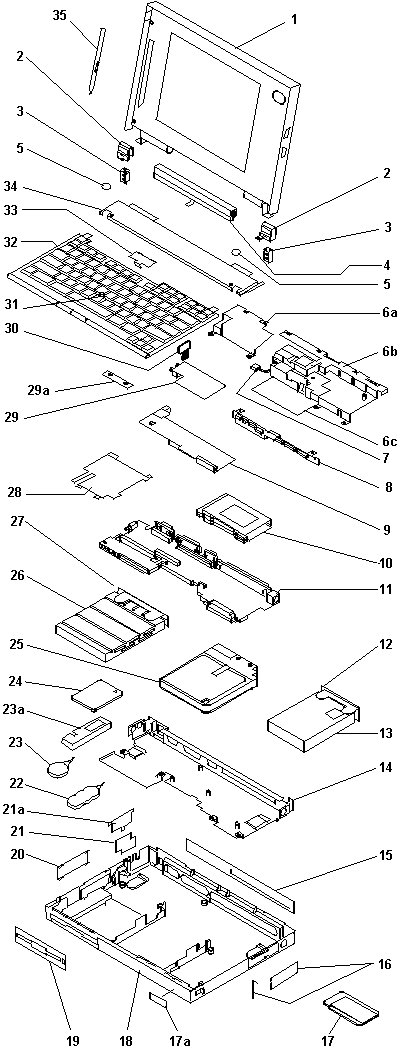
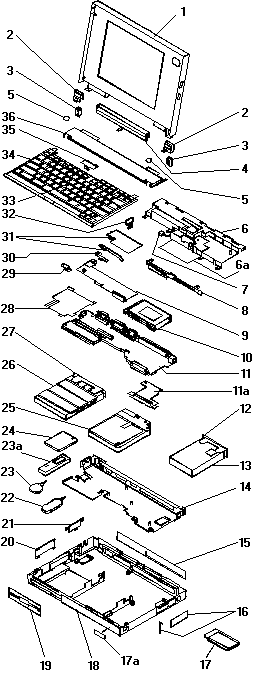
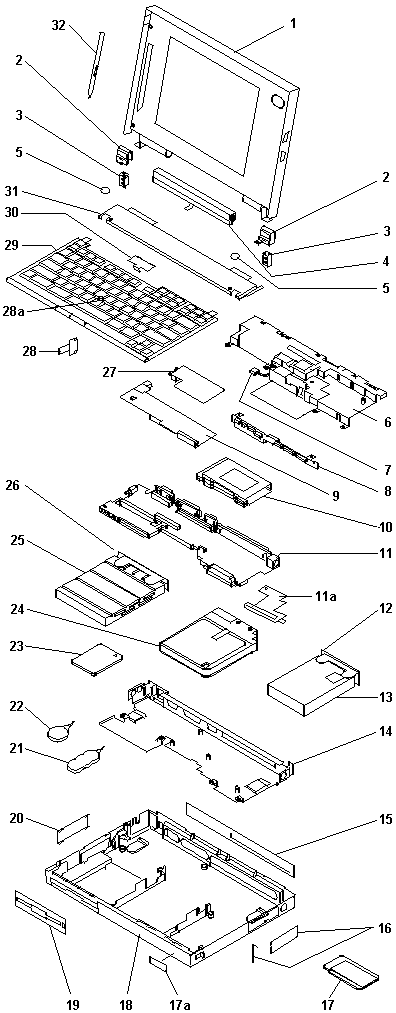
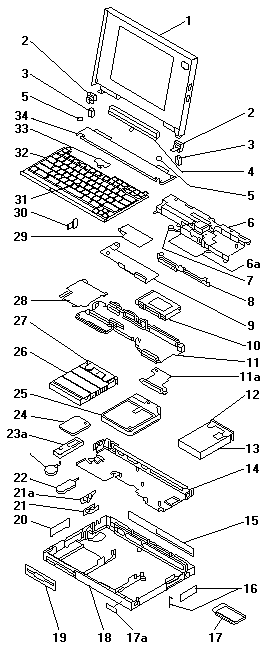
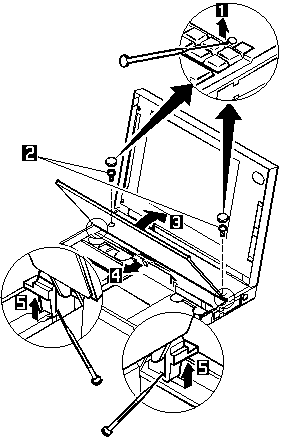
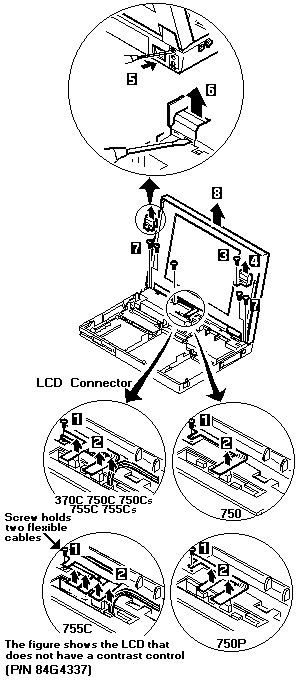
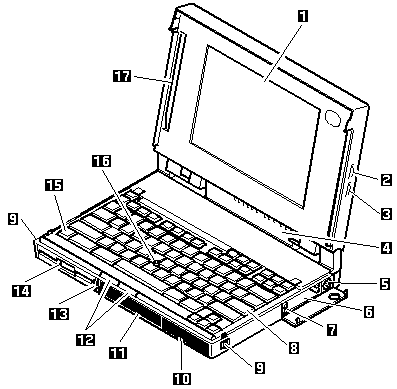
| 1 | LCD Assembly (355, 360) | 84G2265 |
|---|
| LCD Assembly (355C, 360C, 360CE) | 84G5719 |
| LCD Assembly (355Cs, 360Cs, 360CSE) | 84G2264 |
| LCD Assembly (360P) | 84G5721 |
| LCD Assembly (360PE) | 85G9678 |
| 2 | Hinge Cover (355, 360) | 84G2303 |
|---|
| Hinge Cover (355C, 360C, 360CE) | 84G5703 |
| Hinge Cover (355Cs, 360Cs, 360CSE) | 84G2258 |
| Hinge Cover (360P, 360PE) | 84G5704 |
| 3 | Hinge Bracket, Right, Left | 66G5057 |
|---|
| 4 | Status Indicator Assembly (355) | 84G2299 |
|---|
| Status Indicator Assembly (355C) | 84G5722 |
| Status Indicator Assembly (355Cs) | 84G2298 |
| Status Indicator Assembly (360) | 84G2297 |
| Status Indicator Assembly (360C) | 84G5718 |
| Status Indicator Assembly (360Cs) | 84G2251 |
| Status Indicator Assembly (360CE) | 85G2408 |
| Status Indicator Assembly (360CSE) | 85G2407 |
| Status Indicator Assembly (360P) | 84G5720 |
| Status Indicator Assembly (360PE) | 85G9646 |
| 5 | Screw Cover | 66G5046 |
|---|
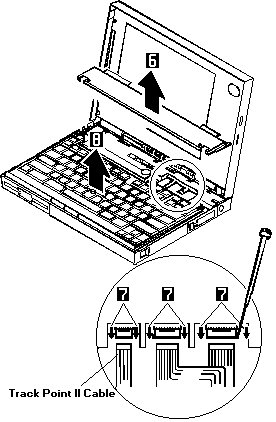
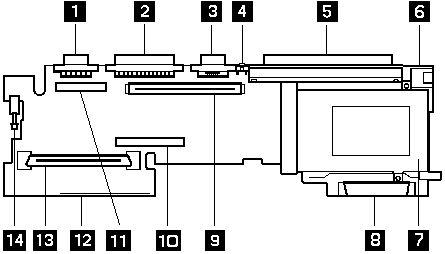
| 6 | Small Shield (355x, 360, 360C, 360Cs, 360P) | 84G5860 |
|---|
| Small Shield (360CE, 360CSE, 360PE) | 84G5639 |
| 6a | Speaker Shield Assembly | 84G2255 |
|---|
| 6b | Insulator | 84G5705 |
|---|
| 7 | Speaker (Includes speaker holder) | 66G3754 |
|---|
| 8 | Interposer Card (355x, 360, 360C, 360Cs, 360P) | 85G0959 |
|---|
| Interposer Card (360PE) | 85G9672 |
| Interposer Card (360CE, 360CSE) | 85G2403 |
| 9 | DC/DC Card | 84G2253 |
|---|
| 10 | PCMCIA Slot Assembly (1-slots, 355x) | 84G2273 |
|---|
| PCMCIA Slot Assembly (2-slots, 360x) | 66G5121 |
| 11 | System Board (355x) | 84G2300 |
|---|
| System Board (360, 360C, 360Cs, 360P) | 84G2252 |
| System Board (360CE, 360CSE, 360PE) | 85G2409 |
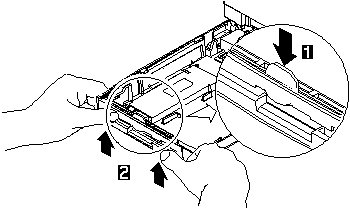
| 12 | HDD Removal Strap | 66G5122 |
|---|
| 13 | Hard Disk Drive (Includes strap, index 12) |
|---|
| 125MB | 84G2271 |
| 170MB | 66G5066 |
| 250MB | 84G2272 |
| 340MB | 66G5068 |
| 540MB | 84G4319 |
| 810MB | 85G0961 |
| 14 | Lower Shield (355x) | 84G2301 |
|---|
| Lower Shield (360x) | 84G2256 |
| 15 | Rear Connector Cover (355x) | 84G2304 |
|---|
| Rear Connector Cover (360x) | 84G2259 |
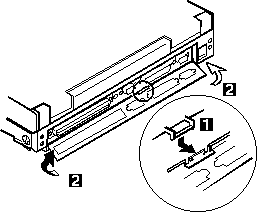
| 16 | PCMCIA Cover (Includes bezels and security plate) | 84G2262 |
|---|
| 17 | PCMCIA Device |
|---|
| 17a | Name Labels | 66G9228 |
|---|
| 18 | Base Cover Assemblies include coil spring, insulator, foot, power switch knob, holder, latch buttons |
|---|
| Base Cover Assembly (355) | 84G2276 |
| Base Cover Assembly (355C) | 84G5717 |
| Base Cover Assembly (355Cs) | 84G2275 |
| Base Cover Assembly (360) | 84G2274 |
| For Benelux | 84G5707 |
| For Japan | 84G5708 |
| Base Cover Assembly (360C) | 84G5711 |
| For Benelux | 84G5712 |
| For Japan | 84G5708 |
| Base Cover Assembly (360Cs) | 84G2250 |
| For Benelux | 84G5709 |
| For Japan | 84G5708 |
| Base Cover Assembly (360CE, 360CSE) | 85G2404 |
| For Benelux | 85G2405 |
| For Japan | 85G2406 |
| Base Cover Assembly (360P) | 84G5714 |
| For Benelux | 84G5715 |
| For Japan | 84G5708 |
| Base Cover Assembly (360PE) | 85G9676 |
| For Benelux | 85G9681 |
| For Japan | 85G2406 |
| 19 | Bezel, Diskette Drive | 84G2260 |
|---|
| 20 | Cover, Option Bay | 84G2261 |
|---|
| 21 | Bracket, Audio Card (option) | 84G2306 |
|---|
| Bracket, Internal Modem (Built-in for 355x, option for 360x) | 84G2291 |
| 21a | Bezel, Audio Card (option) | 84G2307 |
|---|
| Bezel, Blank | 84G2295 |
| Bezel, Internal Modem (Built-in for 355x, option for 360x) | 84G2296 |
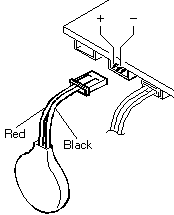
| 22 | Standby Battery | 66G3755 |
|---|
| For Belgium, Dutch | 66G3761 |
| For Switzerland | 66G3758 |
| 23 | Backup Battery | 84G2263 |
|---|
| 24 | Attachment holder | 84G2294 |
|---|
| 25 | IC DRAM Card (See options) |
|---|
| 26 | Battery Pack (Nickel Metal Hydride) | 84G2144 |
|---|
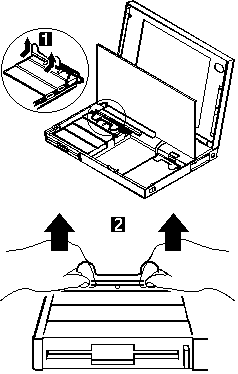
| 27 | Diskette Drive (3-mode) (Includes strap, reference 28) | 84G2269 |
|---|
| 28 | Diskette Drive Removal Strap | 66G5123 |
|---|
| 29 | Base Plate | 84G2293 |
|---|
| 30 | Bracket Shield | 84G5861 |
|---|
| 31 | Internal Modem Card (See options) |
|---|
| Audio Card (option) | 66G5037 |
| 32 | Fax/Audio Spacer (360x) | 84G5862 |
|---|
| 33 | Keyboard Lock | 66G0031 |
|---|
| 34 | TrackPoint II Cap | 66G6444 |
|---|
| 35 | See Keyboard List |
|---|
| 36 | Leaf Spring Plate | 66G0041 |
|---|
| 37 | Upper Cover (355Cs, 360Cs, 360CSE) | 84G2257 |
|---|
| Upper Cover (Other models) | 84G2302 |
| 38 | Stylus Pen (360P, 360PE) | 66G6695 |
|---|
| — | EMI Spring Plate | 85G0948 |
| PCMCIA Security Plate | 85G8625 |
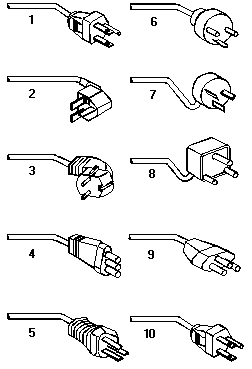
| AC Adapter (100 - 240 V ac, 40W, 3-pin) | 49G2196 |
| For Japan (2-pin) | 49G2197 |
| AC Adapter (100 - 125 V ac, 30W, 3-pin) (This adapter is for U.S. only.) | 84G2277 |
| AC Adapter (35 W, 3-pin) | 85G4952 |
| For Japan (2-pin) | 85G6669 |
| AC Adapter (30 W, U.S only) | 84G2277 |
| DC Plug | 85G6664 |
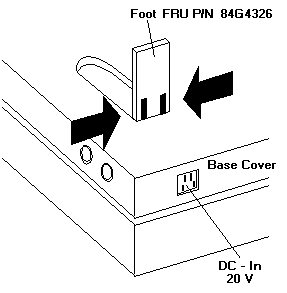
| Foot (right or left) | 84G4326 |


 Warning: Make sure that the diskette does not have more than one label attached to it. Multiple labels can cause damage to the drive or can cause the drive to fail.
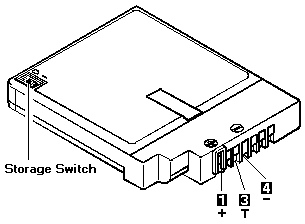
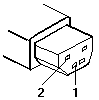
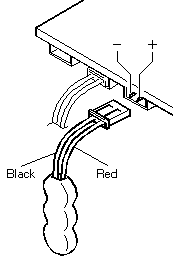

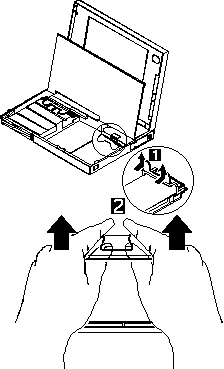
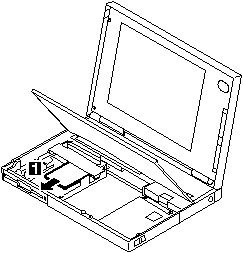
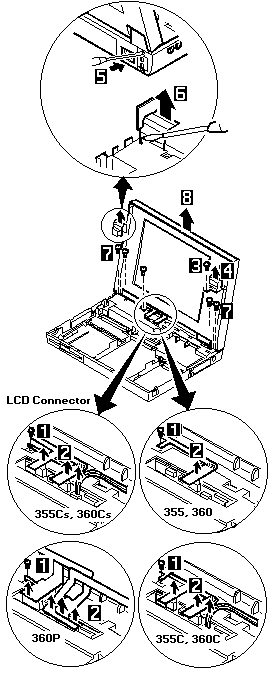
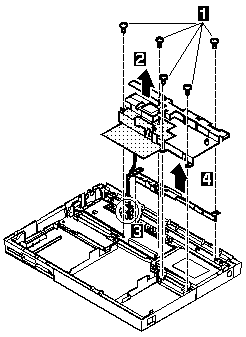
 FRU Removals and Replacements
 The system board is sensitive to, and can be damaged by, electrostatic discharge. Establish personal grounding by touching a ground point with one hand before touching these units.
 An electrostatic discharge (ESD) strap must be used to establish personal grounding.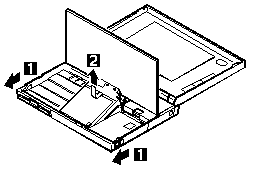
 Safety Notice 5 (translations:
 Passwords - Reset Pushbutton