| Released |
May 1997 |
September 1997 |
March 1998 |
September 1998 |
May 1997 |
— |
September 1997 |
March 1998 |
| Processor |
Intel Pentium, 150 MHz |
- Intel Pentium, 150 MHz
- Intel Pentium MMX, 150 MHz
|
Intel Pentium MMX, 150 MHz |
Intel Pentium MMX, 166 MHz |
- Intel Pentium MMX, 233 or 266 MHz
- Intel Mobile Pentium II, 233 or 266 MHz
|
Intel Mobile Pentium II, 233 or 300 MHz |
- Intel Pentium, 150 or 166 MHz
- Intel Pentium MMX, 150 or 166 MHz
|
Intel Pentium, 150 MHz |
Intel Pentium MMX, 166 MHz |
- Intel Pentium MMX, 233 or 266 MHz
- Intel Mobile Pentium II, 266 MHz
|
| Chipset |
Intel 430MX |
- Intel 430TX (Pentium MMX models)
- Intel 440BX (Pentium II models)
|
Intel 440BX |
Intel 430MX |
— |
Intel 430MX |
- Intel 430TX (Pentium MMX models)
- Intel 440BX (Pentium II models)
|
| Bus |
PCI bus |
| Memory |
Standard 16 MB; maximum 80 MB; EDO, 1 × 144-pin slot |
Standard 32 MB; maximum 96 MB; EDO, 1 × 144-pin slot |
Standard 32 MB; maximum 160 MB; EDO, 1 × 144-pin slot |
Standard 16 MB; maximum 80 MB; EDO, 1 × 144-pin slot |
— |
Standard 16 MB; maximum 80 MB; EDO, 1 × 144-pin slot |
Standard 32 MB; maximum 96 MB; EDO, 1 × 144-pin slot |
| CMOS RAM |
— |
242 bytes |
— |
242 bytes |
| Storage |
2.5" IDE: 1.08 GB; no drive adapter required |
2.5" IDE: 1.35 or 2.1 GB; no drive adapter required |
2.5" IDE: 2.1 GB; no drive adapter required |
2.5" IDE: 2.1, 3.0 or 5.1 GB; no drive adapter required |
2.5" IDE: 3.2, 4.0 or 5.1 GB; no drive adapter required |
2.5" IDE: 4.0 GB; no drive adapter required |
2.5" IDE: 1.35 or 2.1 GB; no drive adapter required |
2.5" IDE: 1.35 GB; no drive adapter required |
2.5" IDE: 2.1 or 3.0 GB; no drive adapter required |
2.5" IDE: 2.1 or 3.2 GB; no drive adapter required |
| Display |
12.1" passive matrix, 800 × 600 |
- 12.1" passive matrix, 800 × 600
- 12.1" active matrix, 800 × 600
|
12.1" passive matrix, 800 × 600 |
- 12.1" passive matrix, 800 × 600
- 12.1" active matrix, 800 × 600
|
- 12.1" HPA passive matrix, 800 × 600
- 12.1" active matrix, 800 × 600
|
13.3" active matrix, 1024 × 768 |
- 12.1" passive matrix colour, 800 × 600
- 12.1" active matrix, 800 × 600
|
12.1" passive matrix colour, 800 × 600 |
- 12.1" passive matrix colour, 800 × 600
- 12.1" active matrix, 800 × 600
|
| Graphics |
NeoMagic MagicGraph 128ZV (NM2093), 1.125 MB video memory |
NeoMagic MagicGraph 128XD (NM2160), 2 MB video memory |
NeoMagic MagicMedia 256AV (NM2200), 2.5 MB video memory |
NeoMagic MagicGraph 128ZV (NM2093), 1.125 MB video memory |
— |
NeoMagic MagicGraph 128ZV (NM2093), 1.125 MB video memory |
NeoMagic MagicGraph 128XD (NM2160), 2 MB video memory |
| Audio |
Crystal CS4236 |
Crystal CS4237B with stereo speakers and microphone |
Crystal CS4236 with mono speaker and microphone |
— |
Crystal CS4236B with mono speaker and microphone |
Crystal CS4237B with stereo speakers and microphone |
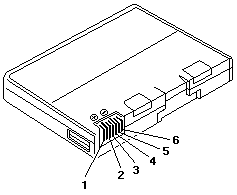
| Main battery |
NiMH (non-intelligent) |
NiMH or lithium-ion (both non-intelligent) |
NiMH (non-intelligent) |
NiMH or lithium-ion (both non-intelligent) |
Lithium-ion (non-intelligent) |
NiMH (non-intelligent) |
— |
Lithium-ion (non-intelligent) |
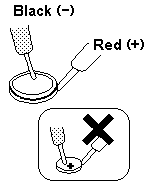
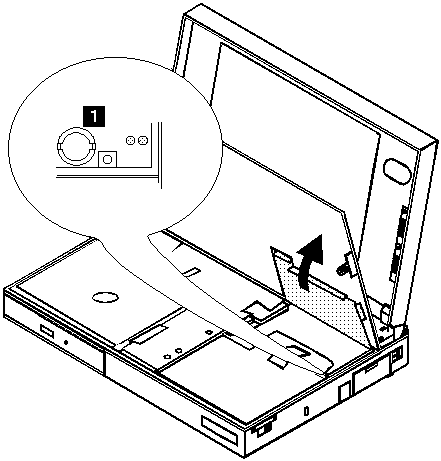
| CMOS battery |
— |
CR1220 lithium cell |
— |
Proprietary lithium cell |
CR1220 lithium cell |
— |
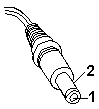
| Power connector |
Barrel jack |
| Media drives |
- Three-spindle
- 3.5" 1.44 MB floppy drive
- CD-ROM drive (optional)
|
- Three-spindle
- 3.5" 1.44 MB floppy drive
- CD-ROM drive
|
- Three-spindle
- 3.5" 1.44 MB floppy drive
- CD-ROM drive (optional)
|
- Three-spindle
- 3.5" 1.44 MB floppy drive
- CD-ROM drive
|
- Three-spindle
- 3.5" 1.44 MB floppy drive
- 8× CD-ROM drive
|
- Three-spindle
- 3.5" 1.44 MB floppy drive
- 20× CD-ROM drive
|
- Three-spindle
- 3.5" 1.44 MB floppy drive
- 24× CD-ROM drive
|
| PC Card slots |
- 2 × PCMCIA
- Zoomed Video support (lower slot only)
|
- 2 × CardBus
- Zoomed Video support
|
- 2 × PCMCIA (2 × Type II or 1 × Type III)
- Zoomed Video support (lower slot)
- Cirrus Logic PD6729 controller
|
2 × CardBus (2 × Type II or 1 × Type III) |
- 2 × PCMCIA (2 × Type II or 1 × Type III)
- Zoomed Video support (lower slot)
- Cirrus Logic PD6729 controller
|
- 2 × CardBus (2 × Type II or 1 × Type III)
- Zoomed Video support
|
| Networking |
None |
| Ports |
- Parallel
- Serial
- VGA out
- PS/2
- Docking connector
- Microphone in
- Line out
|
- Parallel
- Serial
- VGA out
- PS/2
- USB 1.x
- Docking connector
- Microphone in
- Line out
|
- Parallel
- Serial
- VGA out
- PS/2
- Port replicator connector
- Microphone in
- Line out
- Infrared
|
- Parallel
- Serial
- VGA out
- PS/2
- USB 1.x
- Port replicator connector
- Microphone in
- Line out
- Infrared
|
| BIOS |
IBM BIOS with Easy-Setup |
| Pointing device |
TrackPoint |
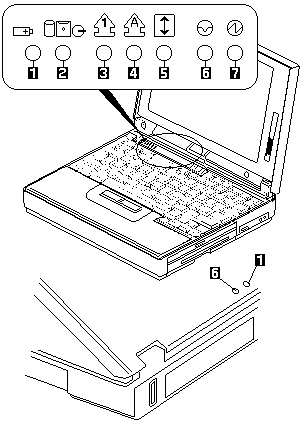
 ),
one of the following messages (called On-Screen Message)
appears at the top left corner of the LCD.
),
one of the following messages (called On-Screen Message)
appears at the top left corner of the LCD.
 The following is not covered under warranty:
 DANGER


 ) button.