Overview #
Introduction: The ThinkPad Expansion Unit acts as a versatile base station for increasing the connectivity of vintage ThinkPads.
Machine Type 3550 · 1995 · 18 sections
ThinkPad Expansion Unit.
Introduction: The ThinkPad Expansion Unit acts as a versatile base station for increasing the connectivity of vintage ThinkPads.
Diagnostic Error Codes
If an error is detected, the following appears:
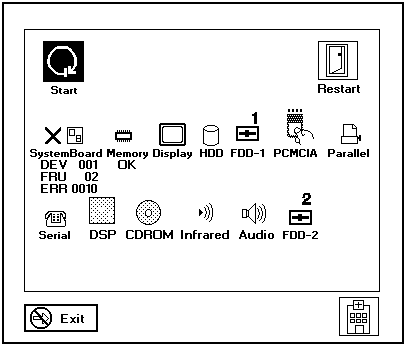
The device ID and error code are used to indicate the detail portion of the FRU which caused the error. If replacing a FRU does not correct the problem, see the device ID or error code from the previous failure. If they have changed, the cause might be because the new FRU is defective or that the FRU was incorrectly installed.
FRU Codes
If an error is detected by the diagnostic tests, a four-digit FRU code is displayed. The FRU code indicates two suspected FRUs. Replace the FRU that is indicated by the two leftmost digits first, then replace the FRU indicated by the two rightmost digits. No FRU is assigned to code 00. If only one FRU is suspected, the other FRU code is filled with zeros. See the referenced page before replacing the FRU.
| FRU Code | FRU/Action |
|---|---|
| 10 | System Board |
| 11 | CPU Card |
| 20 | Memory (See 'Memory Checkout'.) |
| 30 | Reserved |
| 32 | External Keyboard |
| 33 | External Mouse |
| 40 | LCD Assembly |
| 45 | External CRT |
| 50 | Reseat the Diskette Drive (FDD-1) Diskette Drive (FDD-1) |
| 51 | Reseat the Diskette Drive (FDD-2) Diskette Drive (FDD-2) |
| 60 | Reseat the Hard Disk Drive (HDD) Hard Disk Drive (HDD) |
| 72 | PCMCIA Slot Assembly |
| 90 | CD-ROM Drive |
If the problem remains after replacement of the FRUs, go to 'Undetermined Problems'.
 Safety Notice 4
The lithium battery can cause a fire, explosion, or severe burn. Do not recharge it, remove its polarized connector, disassemble it, heat it above 100°C (212°F), incinerate it, or expose its cell contents to water. Dispose of the battery as required by local ordinances or regulations. Use only the battery in the appropriate parts listing. Use of an incorrect battery can result in ignition or explosion of the battery.
La pile de sauvegarde contient du lithium. Elle présente des risques d'incendie, d'explosion ou de brûlures graves. Ne la rechargez pas, ne retirez pas son connecteur polarisé et ne la démontez pas. Ne l'exposez pas à une temperature supérieure à 100°C, ne la faites pas brûler et n'en exposez pas le contenu à l'eau. Mettez la pile au rebut conformément à la réglementation en vigueur. Une pile inappropriée risque de prendre feu ou d'exploser.
Die Systembatterie ist eine Lithiumbatterie. Sie kann sich entzünden, explodieren oder schwere Verbrennungen hervorrufen. Batterien dieses Typs dürfen nicht aufgeladen, zerlegt, über 100 C erhitzt oder verbrannt werden. Auch darf ihr Inhalt nicht mit Wasser in Verbindung gebracht oder der zur richtigen Polung angebrachte Verbindungsstecker entfernt werden. Bei der Entsorgung die örtlichen Bestimmungen für Sondermüll beachten. Beim Ersetzen der Batterie nur Batterien des Typs verwenden, der in der Ersatzteilliste aufgeführt ist. Der Einsatz falscher Batterien kann zu Entzündung oder Explosion führen.
La batteria di supporto e una batteria al litio e puo incendiarsi, esplodere o procurare gravi ustioni. Evitare di ricaricarla, smontarne il connettore polarizzato, smontarla, riscaldarla ad una temperatura superiore ai 100 gradi centigradi, incendiarla o gettarla in acqua. Smaltirla secondo la normativa in vigore (DPR 915/82, successive disposizioni e disposizioni locali). L'impiego di una batteria non adatta potrebbe determinare l'incendio o l'esplosione della batteria stessa.
La bateria de repuesto es una bateria de litio y puede provocar incendios, explosiones o quemaduras graves. No la recargue, ni quite el conector polarizado, ni la desmonte, ni caliente por encima de los 100°C (212°F), ni la incinere ni exponga el contenido de sus celdas al agua. Deséchela tal como dispone la normativa local.
Power Systems Checkout
To verify the symptom of the problem, power on the computer using each of the power sources as follows:
If you suspect a power problem, see the appropriate power supply check listed below.
To verify the symptom of the problem, power on the computer using each of the power sources as follows.
If you suspect a power problem, see the appropriate power supply check listed below.
Note: For Model 365XD, there are two types of adapters. The procedure for checking both types is the same.
Note: An audible noise from the AC Adapter does not always indicate a defective adapter.
Checking the AC Adapter
You are here because the computer fails only when the AC Adapter is used.
NOTE: For Model 365XD, there are two types of adapters. The procedure for checking both types is the same.
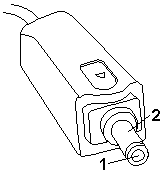
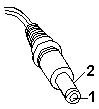
| Pin | Voltage (Vdc) |
|---|---|
| 1 | +14.5 to +17.0 |
| 2 | Ground |
NOTE: An audible noise from the AC Adapter does not always indicate a defective adapter.
Checking Operational Charging
To check operational charging, use a discharged battery pack or a battery pack that has less than 50% of the total power remaining when installed in the computer.
Perform operational charging. If the battery status indicator does not turn on, remove the battery pack and leave it to return to room temperature. Reinstall the battery pack. If the charge indicator still does not turn on, replace the battery pack.
Note: Signal lines, not used in these steps, are used for communication between the system and the battery.
Note: If the voltage of the battery pack is 0 V, it is not defective.
Checking the Battery Pack
Battery charging will not start until the Fuel-Gauge shows that less than 95% of the total power remains, with this condition the battery pack will charge to 100% of its capacity. This protects the battery pack from being overcharged or having a shortened life.
Do the following:
Power off the computer.- Remove the battery pack and measure the voltage between battery terminals 2 (+) and 6 (-).
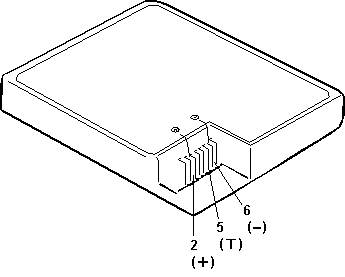
| Terminal | Voltage (Vdc) / Signal |
|---|---|
| 1 | - |
| 2 | +8 to +13.5 |
| 3 | - |
| 4 | - |
| 5 | Thermal |
| 6 | Ground (-) |
NOTE: Signal lines, not used in these steps, are used for communication between the system and the battery.
If the voltage is still less than +9.6 V dc after recharging, replace the battery.
NOTE: If the voltage of the battery pack is 0 V, it is not defective.
If the voltage is more than +9.6 V dc, measure the resistance between battery terminals 5 and 6. The resistance must be 4 K to 30 K ohm.
If the resistance is not correct, replace the battery pack.
If the resistance is correct, replace the system board.
Checking the Backup Battery
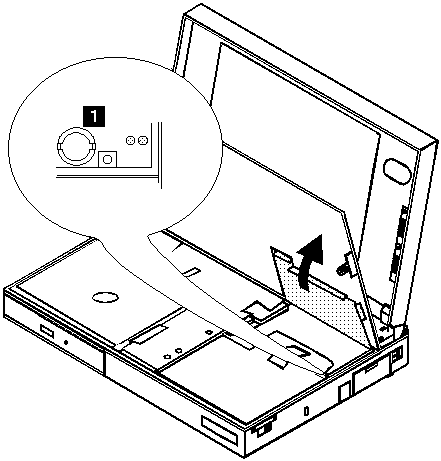
Do not use a metal tool when removing the backup battery. Use only a plastic tool.
| Wire | Voltage (Vdc) |
|---|---|
| + | +2.5 to +3.7 |
| - | Ground |
Note: An audible noise from the AC Adapter does not always indicate a defective adapter.
You are here because the computer fails only when the AC Adapter is used.
| Pin | Voltage (Vdc) |
|---|---|
| 1 | +14.5 to +17.0 |
| 2 | Ground |
NOTE: An audible noise from the AC Adapter does not always indicate a defective adapter.
Note: Signal lines not used in these steps are used for communication between the system and the battery.
Note: If the voltage of the battery pack is 0 V, it is not defective.
Checking the AC Adapter (2635-380/385)
Power off the computer- Remove the battery pack and measure the voltage between battery terminals 1 (+) and 4 (-).
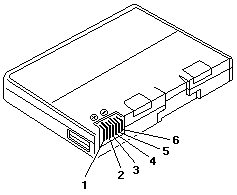
| Terminal | Voltage (Vdc) / Signal |
|---|---|
| 1 | +0 to +13.5 |
| 2 | N/C |
| 3 | Thermal |
| 4 | Ground (-) |
| 5 | Select |
| 6 | A-Ground |
NOTE: Signal lines not used in these steps are used for communication between the system and the battery.
If the voltage is still less than +11.0 Vdc after recharging, replace the battery.
NOTE: If the voltage of the battery pack is 0 V, it is not defective.
If the voltage is more than +11.0 Vdc, measure the resistance between battery terminals 3 and 4. The resistance must be 4 to 30 K ohm.
If the resistance is not correct, replace the battery pack.
If the resistance is correct, replace the subcard.
Note: Be careful not to measure the wrong side of the backup battery.
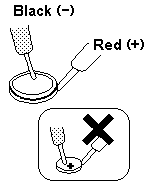
| Wire | Voltage (Vdc) |
|---|---|
| Red | +2.5 to +3.7 |
| Black | Ground |
Note: Only loosen the screw in step 2
2 3 4 5 6 DIMM
2 3 7 Backup battery
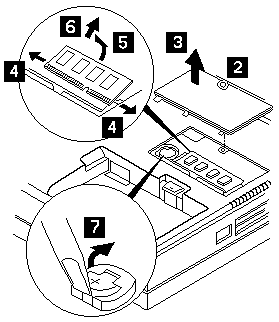
When replacing
Make sure the plus side is on top when replacing the backup battery.
| Step | Location (Quantity) | Length |
|---|---|---|
| 2 | DIMM cover (1) | - |
NOTE: Only loosen the screw in step 2
Note: Make sure that the DIMM is fully installed into the connector. Both latches must be latched completely. A loose connection can cause error code 195.
Memory Checkout
DIMM cards are available for increasing memory capacity.
| DIMM | Displayed Value 2625 365X, XD | Displayed Value 2635 380-385 |
|---|---|---|
| No DIMM installed | 7808KB | 16000KB |
| 8MB | 16000KB | 24192KB |
| 16MB | 24192KB | 32384KB |
| 32MB | 40576KB | 48768KB |
Memory errors might stop system operations, show error messages on the screen, or hang the system.
Use the following procedure to isolate memory problems.
NOTE: Make sure that the DIMM is fully installed into the connector. Both latches must be latched completely. A loose connection can cause error code 195.
If memory problems occur intermittently, make sure the DIMM socket latches are latched completely. If the DIMM latches are securely latched, use the loop option to repeat the test. When the test detects an error, an error log is printed on the printer connected to the parallel port.
for more information.
Undetermined Problems
You are here because the diagnostic tests did not identify which adapter or device failed, installed devices are incorrect, a short circuit is suspected, or the system is inoperative. Follow the procedures below to isolate the failing FRU (do not isolate non-defective FRUs).
Verify that all attached devices are supported by the computer.
Verify that the power supply being used at the time of the failure is operating correctly.
Power off the computer.- Check the cables, wires, and connectors for short circuits and open circuits. Visually check them for damage. If any problems are found, replace the FRU.- Remove or disconnect all of the following devices.
If ThinkPad 2625 365X, XD then replace
If ThinkPad 2635 380/385 then replace
Error Log
Diagnostic errors are printed on the printer that is attached to the parallel port when the error is detected. The error is also logged in the system memory.
Do the following to display the errors:
The error log is not saved when the system is powered-off.
Diagnostic errors are printed on the printer that is attached to the parallel port when the error is detected. The error is also logged in the system memory.
Do the following to display the errors:
The error log is not saved when the system is powered-off.
Device ID
If an error is detected by the diagnostic tests, a three-digit device ID is displayed. The device ID indicates the suspected device.
| Icon | Device ID | Suspected Device |
|---|---|---|
|
001
003 007 086 |
System Board
Keyboard Math Coprocessor Pointing Device |

|
002 | Memory |

|
050 | Display |

|
017 | Hard Disk Drive |

|
006 | Diskette Drive |

|
066 | External Diskette Drive |

|
080 | PCMCIA |

|
009 | Parallel |

|
011 | Serial |

|
215 | CD-ROM |

|
103 | Infrared port |

|
150 | Audio (ESS AudioDrive Sound Chip) |