| 00010200, 00010300, 00010400, 00010700 |
- System Board
|
| 00010800 |
- System Board
- Processor card
|
| 00011000 |
- Go to Memory Checkout before replacing any FRUs.
- Base Memory Card
- IC DRAM Card
- System Board
|
| 000113XX |
- System Board
- Processor Card
|
| 000118XX |
- Clear Error Log. See System Error Log.
-
If the error remains, replace the FRUs in the following order:
- Base Memory Card
- IC DRAM Card
Note: Error Log must be cleared when a FRU is replaced.
|
| 00016100 |
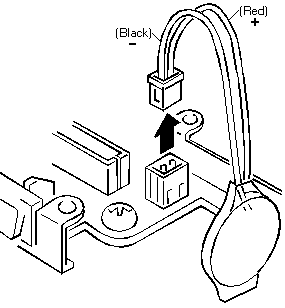
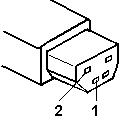
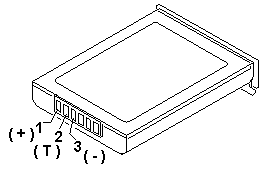
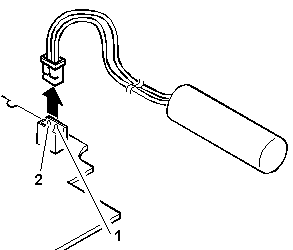
- See Checking the Backup Battery.
- System Board
- Voltage Converter
|
00016300, 00016400, 00016500, 00016900
(If 00016300 appears, set date and time first in the Reference Diskette.)
(If setting configuration does not solve the problem, see
Checking the Installed Devices List.) |
- Set Configuration/Features
- System Board
- Hard Disk Drive
- Base Memory Card
- IC DRAM Card
|
| 000171XX, 000172XX |
- System Board
|
00017300
(700, 700C Only)
Before replacing a FRU, restore the system partition with the Reference Diskette Version 1.1 or
later. See Installing a New Version of
the System Diskettes. |
- See 173 and 11350 Error Combination before replacing FRUs.
- See Checking the Backup Battery.
- Voltage Converter
|
00017400
(If Automatic Configuration does not solve the problem, run Advanced Diagnostic.) |
- Set Configuration/Features
|
| 000175XX, 00017700, 00017800 |
- System Board
|
| 000179XX |
- Run System Unit and Memory Diagnostic.
- or -
- Select More utilities to clear the system error log.
|
| 000183XX |
- PAP (Privileged Access Password) is needed to boot from the System Program.
|
| 000184XX, 00018500 |
- System Board
|
| 000187XX |
- Set Configuration
- System Board
|
| 000188XX |
- System Board
|
| 000189XX |
- Select More utilities to clear the system error log.
|
| 00019000 |
- Reseat System Board
- Reseat CPU chip / Processor Card
- System Board
|
| 00019102 |
- Rerun diagnostics tests.
- If error remains, see 000191XX.
|
000191XX
(Not listed above) |
- Reseat System Board
- Reseat CPU chip / Processor Card
- System Board
|
| 00019200 |
- Voltage Converter
- Keyboard Control Card
- System Board
|
| 00019201 |
- Voltage Converter
|
| 00019202 |
- Run System Unit Diagnostic. If this error message appears frequently, replace the Processor Card.
|
| 00019300, 00019301, 00019305 |
- System Board
|
| 00019302 |
- Hard Disk Drive
- System Board
|
| 00019303 |
- System Board
- Diskette Drive
|
| 00019304 |
- PC Card
- System Board
|
| 00019306 |
- Keyboard Control Card
- Keyboard
- Pointing Device
|
| 00019400 |
- Processor Card
|
| 000199XX |
- System Board
|
0001XXXX
(not listed above) |
- System Board
- Processor Card
|
000215XX
(720, 720C only) |
- Reseat Base Memory Card (interface connector on system board).
|
0002XXXX
(See Memory Checkout before replacing any FRUs.) |
- Base Memory Card
- IC DRAM Card
- System Board
|
00030100, 00030500
(Power-on the computer before external devices.)
(See 1080 Keyboard Unit before replacing any FRUs.) |
- Keyboard Control Card
- System Board
- Keyboard
- Numeric Keypad or Keyboard/Mouse Cable (if attached) or External Keyboard (if attached)
|
00030200, 00030300, 00030400
(See 1080 Keyboard Unit before replacing any FRUs.) |
- System Board
- Keyboard Control Card
- Keyboard
- Numeric Keypad or Keyboard/Mouse Cable (if attached) or External Keyboard (if attached)
|
00030600
(See 1080 Keyboard Unit before replacing any FRUs.) |
- Keyboard
- Numeric Keypad or Keyboard/Mouse Cable or External Keyboard (if attached)
- Keyboard Control Card
- System Board
|
| 00030700 |
- External Keyboard
- Keyboard/Mouse Cable
|
| 0004XXXX |
- System Board
- Any Parallel Device
- Communication Cable
|
| 000601XX |
- Diskette Drive
- System Board
- Diskette Drive Cable
|
| 000602XX |
- Defective Diskette
|
| 000628XX |
- Incorrect Diskette Media Type
- Diskette Drive
- System Board
- Diskette Drive Cable
|
| 000655XX, 000662XX, 000670XX - 000675XX |
- System Board
- Diskette Drive
- Diskette Drive Cable
|
0006XXXX
(Unsupported drive or cable) |
- Diskette Drive
- System Board
- Diskette Drive Cable
|
| 0007XXXX |
- Math Coprocessor
- Processor Card
|
| 0011XX00 |
- System Board
- Any Serial Device
- Communication Cable
|
| 0014XXXX |
- See Printer Checkout before replacing any FRUs.
- Printer
- System Board
|
| 00180100, 00186100 |
Replace the line QEMM386.SYS with QEMM386.SYS XBDA:L in Config.sys. |
| 0024XX00 |
- Video Card
- System Board
- Voltage Converter (700C, 720C only)
|
| 0039G900 |
- System Board
|
| 005002XX, 005006XX,
005008XX, 005041XX |
- See External Display Self-Test before replacing any FRUs.
- Video Card
- External Display
- LCD
- System Board
|
| 005004XX, 005010XX,
005030XX - 005032XX,
005051XX - 005062XX |
- Video Card
- System Board
- LCD
|
| 005009XX, 005040XX |
- See External Display Self-Test before replacing any FRUs.
- External Display
- Video Card
- System Board
|
| 0080XXXX |
- System Board
- PCMCIA Card Slot
|
| 0085XXXX |
- Do not replace any FRUs. The installed Memory Expansion Adapter is not supported by IBM.
|
00860100, 00860200
See 1080 Keyboard Unit before replacing any FRUs. |
- Pointing Device
- System Board
- Numeric Keypad
|
00860300, 00860400, 00862300, 00862400
See 1080 Keyboard Unit before replacing any FRUs. |
- System Board
- Keyboard Control Card
- Pointing Device
- Keyboard (TrackPoint)
- Numeric Keypad
|
00861100, 00861200, 00861300
See 1080 Keyboard Unit before replacing any FRUs. |
- Keyboard Control Card
- Keyboard (Pointing Stick)
- System Board
- Ext. Keyboard Cable
|
00861XXX
(not listed above)
See 1080 Keyboard Unit before replacing any FRUs. |
- Keyboard (Pointing Stick)
- Keyboard Control Card
- System Board
|
00862100, 00862200
See 1080 Keyboard Unit before replacing any FRUs. |
- Keyboard Control Card
- System Board
- Keyboard (TrackPoint)
|
00862500, 00862600
See 1080 Keyboard Unit before replacing any FRUs. |
- Keyboard (Pointing Stick)
- Keyboard (TrackPoint)
- Keyboard Control Card
|
0086XX00
See 1080 Keyboard Unit before replacing any FRUs. |
- Keyboard Control Card
- Keyboard
- System Board
|
| 010103XX - 010110XX,
010116XX - 010153XX,
010171XX |
- See Fax/Modem Checkout
|
| 010436XX |
- System Board
- Hard Disk Drive
|
| 0104XXXX |
- Hard Disk Drive
- System Board
|
| 0129XXXX |
- Run System Board diagnostics to clear the error log and retest
- Select N to the question during the System Board diagnostics.
- Power-on the system. If the error remains, replace the Processor Card.
- Repeat steps 1 and 2.
- If the problem remains, replace the system board.
|
| 0130XXXX |
- Indicator Assembly
- System Board
- Keyboard Control Card
- Hard Disk Drive
- Diskette Drive
- Diskette Drive Cable
- Speaker
|
| 0137XXXX |
- Serial Adapter
- System Board
- Video Card
- Any Serial Device
- Communication Cable
|
| 0194XXXX |
- Do not replace any FRUs. The installed Memory Expansion Adapter is not supported by IBM.
|
| I99903XX, I99900XX, I99800XX |
- Reseat the hard disk drive to ensure good connection.
- See Set Startup Sequence.
- Hard Disk Drive
- System Board
|
| I999XXXX |
Restore the system partition from the Reference Diskette. |


 Warning: The drives might have been rearranged or the drive startup sequence might have been altered.
Be extremely careful during write operations such as copying, saving, or formatting. Data or
programs can be written over if you select an incorrect drive.
Warning: The drives might have been rearranged or the drive startup sequence might have been altered.
Be extremely careful during write operations such as copying, saving, or formatting. Data or
programs can be written over if you select an incorrect drive.

 Safety Notice 8